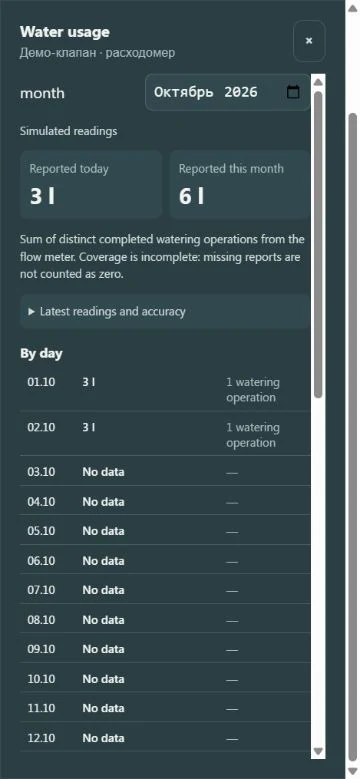
A running pump does not tell you how much water the plants received. GrowerHub now has a separate water meter report view for today, a selected month and individual calendar days. For recognised formats, volume comes from the valve rather than a runtime calculation.
Where to find it
Open Settings → Devices and find a valve with Water usage. The panel contains two totals, a calendar list and completed irrigation reports. Select another month or expand the latest readings.
The illustration shows a virtual demo farm. Its litres are simulated, not measurements from physical equipment.
Repeated reports do not create another watering
A valve may repeatedly report its last irrigation. GrowerHub counts each unique completed operation once. Message arrival time does not replace irrigation time: yesterday's event stays historical even if its report arrives today.
Days and months follow your profile time zone. If irrigation crosses midnight without sufficient intermediate readings, the full volume belongs to the ending day. The details explain this rule.
Missing data stays missing
No report does not mean zero consumption. Missing days show No data, and monthly totals have an incomplete coverage note. Conflicting reports are not presented as precise measurements.
The journal distinguishes measured, estimated and unknown volume. Shared water is not assigned in full to every plant.
Equipment requirements
The button appears when the server recognises the meter reports. A meter in a product description alone does not establish compatibility. Reading usage does not authorise irrigation commands: command support and physical validation are separate.
Try the demo valve or use the manual log guide and template.