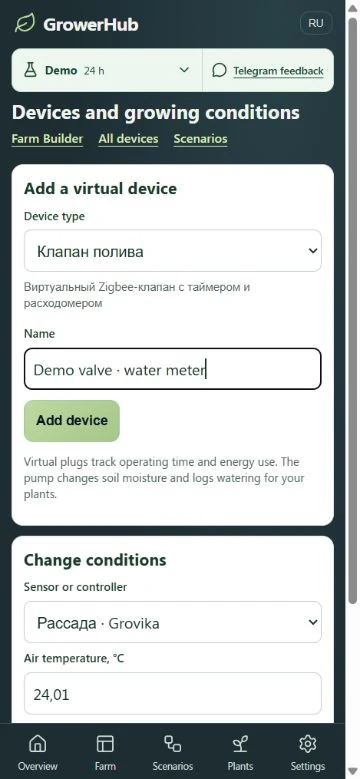
Explore irrigation automation before buying a valve. The demo device catalogue now includes a virtual valve with a water meter. Add it, assign it to a greenhouse and inspect results in the shared GrowerHub interface.
Add it to your demo farm
Open the demo without registering. In Settings → Demo devices, select the metered valve, optionally name it and add it. Adding the device alone does not change existing greenhouse watering.
In the Farm constructor, assign it to a greenhouse watering slot. If a pump is assigned, the app offers to change that assignment. This only affects your virtual farm.
Things to try
- Run a short bounded manual watering and inspect its history.
- Configure days and time in observation.
- Choose pulses: short runs have pauses and belong to one session.
- In Settings → Devices → Water usage, inspect daily and monthly litres.
The catalogue and readings are demonstration data. Virtual flow is a simulation parameter, not a physical valve specification or a recommended plant dose.
Shared app screens
The valve belongs to the shared demo farm. Constructor, automations, manual watering, statistics and journal are the same app features, so you can explore changes without real water.
Guest changes have a limited lifetime shown in the banner. Use the app's sign-in path to save a demo farm to an account. Physical devices are connected separately.
Simulation does not establish a specific Zigbee valve's compatibility or safe operation. Physical equipment needs a supported profile and device validation.