Watering is scheduled for the morning, but rain is forecast. An outdoor bed can wait; rain will not replace water under a roof. GrowerHub now offers explicit forecast-rain handling for the new scheduled, local dry-anchor and drying-forecast watering modes.
Enable it separately for each growing area. It delays the fixed dose you set and does not choose a new watering duration on its own.
What the plan shows
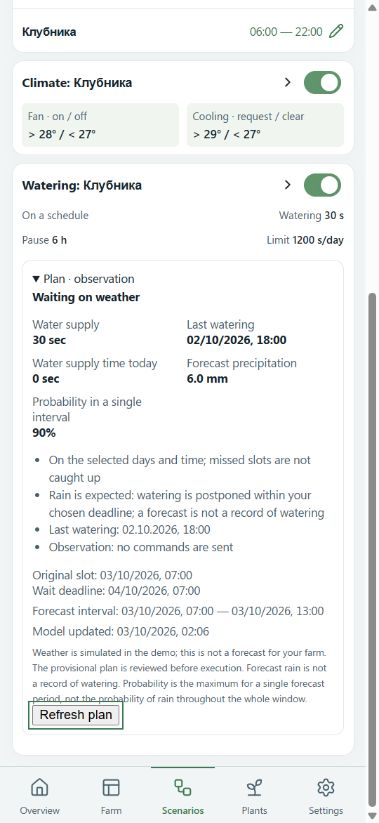
Expand Plan · observation below the watering scenario. You can see expected precipitation in millimetres, a separate probability, the source and the model update time. A delay also shows the original watering time and Wait deadline.
The screenshot uses a training demo farm with simulated rain. The expected 6 mm explains the delay; observation mode does not switch the water on.
The check covers six hours from the planned watering time, or the current time when watering has already been delayed. It uses whole available forecast intervals, which may be longer further into the forecast. The plan shows their actual boundaries. Probability is the maximum for an included interval, not the probability for the entire window. Missing probability appears as Not provided.
Set it up
- Open Settings → Zones and expand Forecast location for your farm. Enter coordinates manually or use the location button on your phone. Saving the location requires your confirmation.
- In Scenarios, choose the greenhouse and a new watering mode. Keep Observe without commands for your first check.
- Enable Consider forecast rain. Select Rain reaches the soil for an outdoor area, or Under cover — keep watering for a covered one.
- For an outdoor area, set a precipitation threshold, a wait limit and an unavailable-forecast policy. Scheduled watering also has permitted hours for delays; the original scheduled time must fall within them.
- Save, expand the plan and check its explanation. Watering control is enabled separately after equipment and settings have been checked.
Choose the threshold for your own bed. For example, 2 mm means “delay when at least 2 mm is forecast”; it is not a recommendation for your plants' water needs. Coordinates are rounded to two decimal places on your phone before saving. The server sends rounded coordinates to the weather provider only for areas with rain handling enabled. Covered areas need no forecast request.
Waiting has a deadline
The forecast is checked again before watering. If expected rain disappears, watering can return to the plan within permitted hours. Minimum intervals, daily limits and equipment availability still apply. A forecast change at night waits for the permitted window.
The wait limit runs from the original time and does not move forward on every refresh. The maximum configurable delay is 72 hours. If the deadline passes, or the next permitted window starts after it, the slot is skipped. There is no automatic late catch-up watering. Check your plants and the reason for a skipped slot.
When a forecast is unavailable, stale or incomplete, the selected policy applies: wait until the deadline, then skip the slot, or continue using the base rule. Snow and mixed precipitation do not count as rain replacing irrigation. Existing scenarios do not enable weather handling automatically.
Change the weather in the demo
In the demo farm's Settings, use Outdoor weather to switch between clear weather, rain and an unavailable forecast. The choice is saved in your demo farm. Scenarios, checks and the plan screen use the shared app; the demo neither contacts the real weather provider nor controls physical devices.
A forecast is not logged as observed rainfall or measured irrigation. It explains why the plan waits, but does not prove how much water reached the soil.
Real forecasts come from MET Norway Locationforecast, licensed under CC BY 4.0. The free service does not guarantee availability; the selected failure policy is visible in the plan.