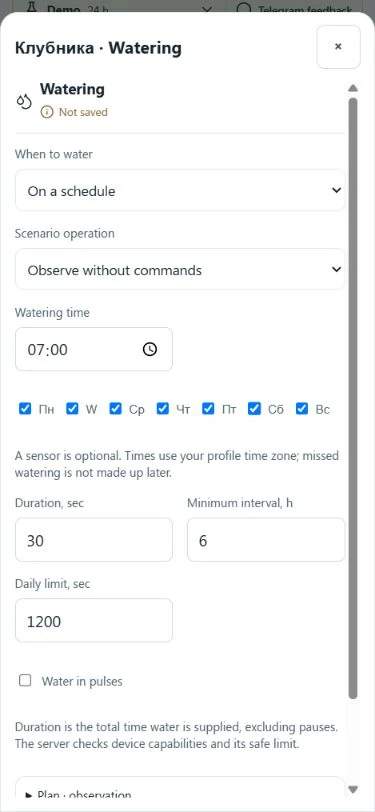
Once you have checked your normal water dose, you can tie irrigation to specific days and a time. GrowerHub now offers scheduled watering without a mandatory soil sensor. Trigger conditions and delivery limits stay visible in one editor.
Set it up
- In the Farm constructor, assign an admitted pump or valve to the greenhouse watering slot.
- In Automations, select the greenhouse and open watering settings.
- Choose By schedule, then select weekdays and a time.
- Set delivery duration, the minimum interval and the daily delivery time limit.
- Save Observe without commands and enable the scenario to inspect its plan without operating equipment.
Times follow your profile time zone. Screenshot values are demo examples, not crop watering recommendations.
Observe before control
A newly selected mode starts in observation: it calculates a time and explains constraints without sending commands. After checking the settings, explicitly select Control watering and confirm the change for an enabled scenario.
Device admission, availability, greenhouse state, interval and daily limit are checked before execution. Saving a time does not remove these checks.
Pulses and missed times
A capable executor can split delivery into short runs separated by pauses. Duration means total water delivery time, excluding pauses. The server determines capabilities; not every Zigbee valve is admitted for control.
A missed watering is not caught up after an interruption. Clock changes do not create duplicate runs for one scheduled occurrence. Your previous rule stays until you choose a new mode.
Explore the editor and virtual valve without equipment in the shared demo farm.