When did you last repot your monstera? What did its new leaf look like last week? GrowerHub can keep those answers even when your setup is just a windowsill plant and a phone.
No coordinator, sensors or pump are required. Each plant gets a card, photographs, care history and planned tasks. Add hardware later while keeping the same account and journal.
Start with one plant
- Sign in to GrowerHub. During initial setup, choose A journal without equipment.
- In Plants, choose Add plant. Give it a recognisable name; the other fields are optional.
- Open its journal. About this plant lets you add a description and location, such as “living room” or “seedling shelf”. You may leave the planting date unknown.
- Save an observation or photo. Search your plant list by name, variety or location.
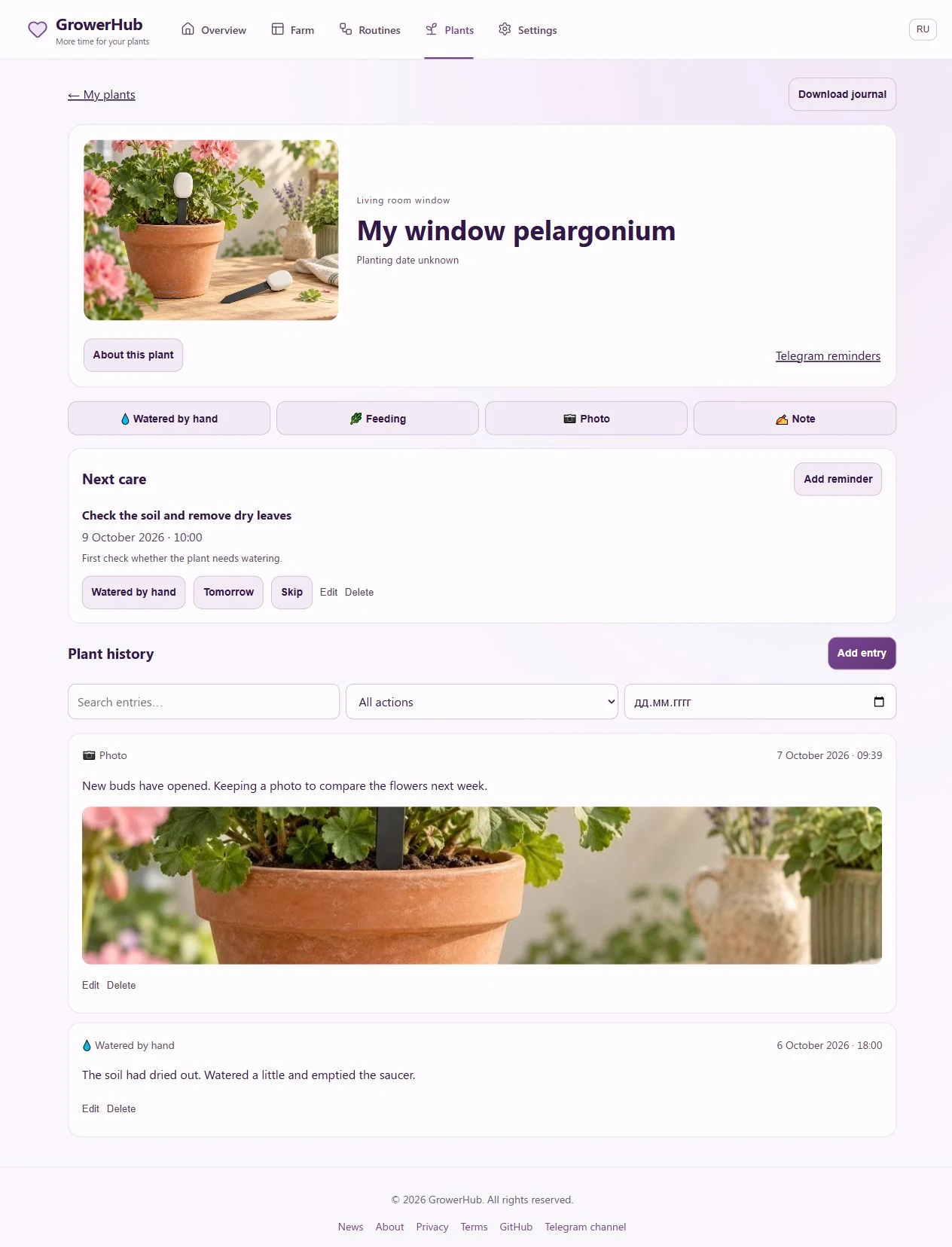
The screenshot shows a training journal with a plant illustration instead of a personal photograph. This is the working interface, not a mockup.
Photos and care history
Watered by hand, Feeding, Photo and Note open a short form. Repotting, pruning, treatment and inspection are also available in the care-type list.
Choose a date, write an observation and select images from your gallery. Your phone may also offer its camera. A saved image becomes the card’s cover. You can record yesterday’s repotting today by changing the entry date.
Manual entries allow date, text and photo edits. Recorded equipment watering remains factual and cannot be edited through this form. A manual care entry never switches on a pump or socket. An unmeasured volume stays unknown.
Search the history by words, care type and date. Older entries load with Show more. Download journal exports text history as Markdown; it is not a backup of original photographs.
Tasks that prompt you to check the plant
Choose Add reminder, then enter a title, date and care type. “Check the monstera’s soil” is a useful example. For a repeat, set the number of days and choose:
- Completion: count the next interval from actual completion.
- Scheduled date: keep the selected rhythm without a backlog of duplicate tasks for missed days.
Watered by hand or Done creates a care entry. Tomorrow postpones a task and Skip closes the current occurrence without claiming care was performed. Tasks can be edited or deleted.
A schedule cannot determine your plant’s water needs. Check the soil and plant before logging watering. Postpone or skip when watering is unnecessary.
Connect Telegram
- Open Settings → Notifications, or Telegram reminders in a plant card.
- Choose Connect Telegram, follow your personal link to @GrowerHubCareBot and start the bot.
- Return to settings, refresh the status and confirm the displayed Telegram profile. Starting the bot alone does not finish linking. The link expires after 15 minutes; request a new one if needed.
- Choose a daily summary hour and quiet hours. Times follow your GrowerHub profile’s time zone. Send a test message.
Summaries include tasks that are already due. No empty automatic summary is sent; tasks becoming due later may trigger that day’s summary. After a summary has been sent, new tasks remain on the website until the next day or your /today request. Up to three tasks have buttons in a message; open the journal for the full list.
/today lists due tasks, /help explains the bot and /stop disables reminders. You can also disconnect or change Telegram on the website. Test messages and replies to your commands are sent immediately; daily summaries respect quiet hours.
“Accepted by Telegram” means Telegram accepted the message, not that you read it. An uncertain delivery result is not retried automatically. Your care entries remain on the website regardless of delivery.
Current limits
- Plants, entries and photographs are private to their account owner.
- Up to 6 photos per entry and 200 per account. Images are saved at up to 1600 pixels on the longest side; the server validates files and strips metadata. JPEG and PNG are reliable choices. If HEIC cannot be opened, save a JPEG copy; the form retains your text.
- Demo uses the shared interface but cannot link a personal Telegram chat or send external messages.
- The bot currently replies in Russian. Text and photos are added on the website, not directly in the bot.
- Public plant pages, automatic social posting and equipment alerts are outside this release. Email and MAX are not included.
Try one plant and one image. Add another observation a few days later to build a useful history of your own plant.