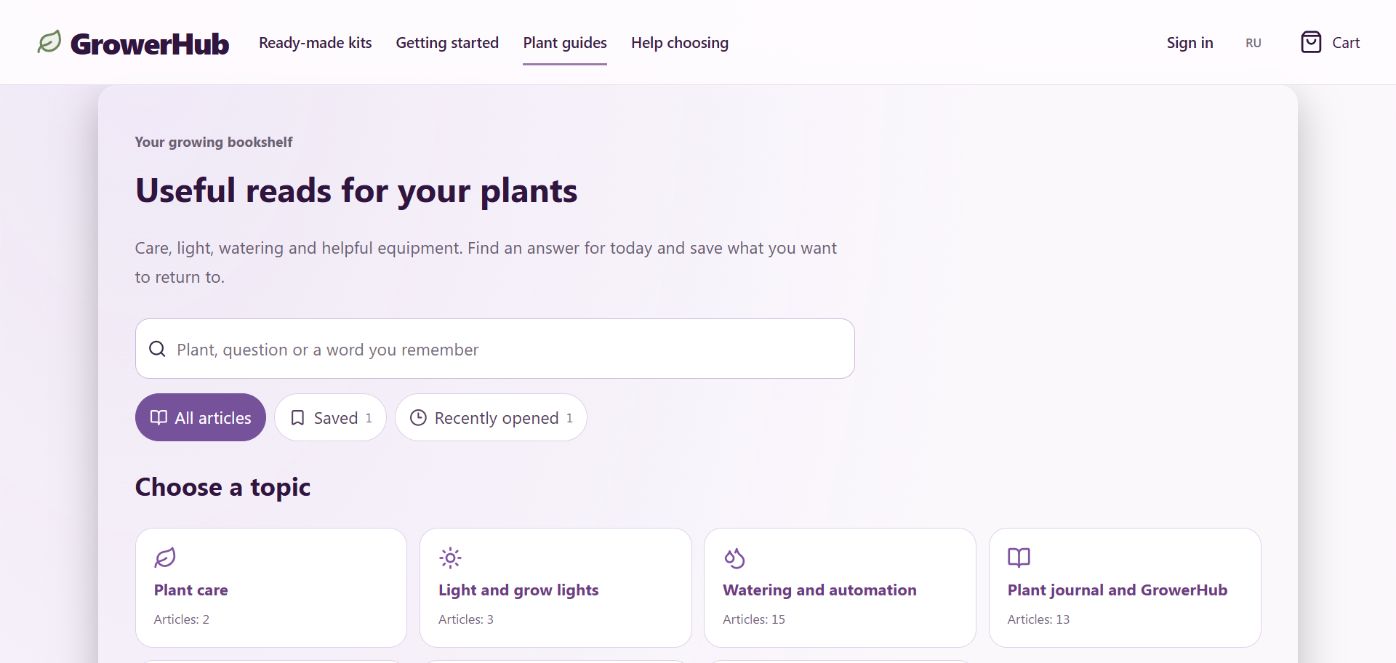
You read how to store dahlias, then digging day arrives and you cannot remember where that guide was. GrowerHub now has a reading shelf for moments like this. Open Plant guides in the top menu. On a phone, first tap the menu button at the top right.
Start with a topic
The article library starts with seven topics: plant care, light and grow lights, watering and automation, plant journal and GrowerHub, sensors and equipment, greenhouse and nursery, and Home Assistant and DIY. Six recent articles appear below.
Choose a topic to see article cards with short descriptions. Longer lists have a Show more articles control. The “Help me choose where to start” section offers a route into an unfamiliar subject.
Search for a word you remember
Enter a plant, a task or a familiar term such as “dahlia”, “watering” or “lux”. Search checks titles, summaries and topic names. Results appear as you type.
If a long question finds nothing, try one or two key words. Search does not yet look through the full article text. Clear the field with the cross button to return to the topics.
Save something for later
- Tap the bookmark on a card or Save article inside the guide.
- Open Saved in the library. An article also has a “My saved articles” link.
- Tap the bookmark again to remove it from your list.
No account is needed. Russian and English versions share one bookmark, so changing language does not create a duplicate.
Find a guide you already opened
Recently opened remembers the last 12 articles whose text loaded in this browser. Opening one again moves it to the top. This helps when you found something useful but forgot to save it.
You can clear this history without deleting saved articles. Each article has a link back to its topic at the top, plus related reading and a route back to the library at the bottom.
Where your shelf lives
Saved and recent articles stay on this device, in this browser. They survive a normal page reload, but do not automatically move between your phone and computer. Clearing site data removes both lists. Private browsing may remove them when you close the window.
If browser storage is unavailable, the site explains that your shelf will work until the page is closed or reloaded. You can also share the article link or use your browser's own bookmarks.
Start with the topics or browse plant lighting and keep useful reading within reach.