
You want to check the plant tomorrow morning: look at the new leaf and feel the soil. It sounds too simple to forget. Then morning brings breakfast, messages and a dozen other jobs, and you notice the pot again in the evening.
You can leave that thought with the GrowerHub assistant while it is still fresh. It prepares a reminder for a plant, shows the due date and waits for confirmation. We checked this conversation on the demo farm.
Start with the job you actually need
Our task was to check soil moisture. The decision to water comes after inspecting the plant. The reminder helps you return to it; it does not switch on equipment.
If the plant already has a journal card, use that card's name. The journal without hardware guide shows how to start with one plant. This task needs no sensor or pump.
The request we tried
In the demo, we asked the assistant to select one plant. This is an English translation of our checked Russian request; use the zone name displayed in your demo:
On the demo farm, choose one plant in the “Tomatoes” zone. Prepare a reminder to check its soil moisture tomorrow at 10:00 in the farm time zone. Before confirmation, name the plant and the date. Leave other records and rules unchanged.
It says what to do, when to remember it and what to show before saving. For your own journal, name the specific plant instead of asking for one from a zone.
The assistant selected Cherry tomato and gave 24 October 2026 at 10:00 in the farm time zone. It was already 23 October there during our check, so “tomorrow” became the following day. Your date will depend on when you send the request.
Check the plant and the time
Before confirming, read the selected plant and due date. If you have several similar plants, make sure the name identifies the one you mean.
Check the time zone, too. Our farm used Moscow time, UTC+3. The proposal card displayed 07:00 UTC: the same instant as the 10:00 Moscow time in the reply. Clarify the due time if the card and explanation are unclear to you.
This is the moment to catch the wrong plant or day. The proposal is still waiting for your decision.
After confirmation
We pressed Confirm and saw Change applied. The reminder was saved. Watering, other journal records and rules stayed unchanged.
Later, we reopened the Cherry tomato journal. Next care still showed the soil check for 24 October at 10:00. The plant, task and time were there together, ready for the next visit.
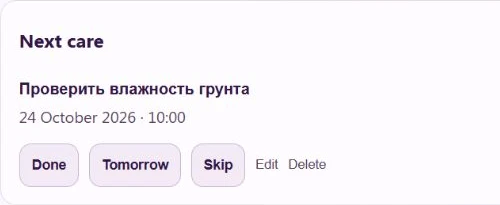
The journal is shown in English. The task keeps its original Russian name, meaning “Check soil moisture”.
You can try this in the demo without hardware. The demo sends no external Telegram messages. For your own journal, the main guide explains connecting reminders; saving a task and delivering a message are separate steps.
When inspection time comes, check the plant and soil, then record the care you actually performed or postpone the task. That gives the reminder a useful continuation in your journal.
Open the assistant in the demo and try the request. Review the plant and date before confirming to finish your first setup.