Two grow boxes rarely behave alike. Their lights produce different amounts of heat, the growing medium dries at different rates, and the plants need different care. A flat list of switches and sensors makes it hard to see what is happening in the second box. Organizing equipment by growing zone gives each reading and action a clear context.
GrowerHub calls a growing zone a greenhouse. It can represent an actual greenhouse, a grow box or a shelf; several zones belong to one farm. You can try this structure before buying equipment: open the demo farm without signing up. It comes with four zones — Seedlings, Herbs, Tomatoes and Strawberries — plus virtual devices, plants and recorded history.
Separate the boxes and shared equipment
Create one farm and two greenhouses with recognizable names. Assign sensors, lights and pumps to the zones they serve. A shared air conditioner can belong to the farm; the overview shows which greenhouses are requesting cooling.
| What you want to check | Where to look |
|---|---|
| Temperature, moisture and equipment state in each box | Overview |
| How readings changed over time | Select a sensor in the overview |
| Which sensor, light or pump belongs to a zone | Farm Builder |
| Light schedules and climate or watering conditions | Automations, called Scenarios on a phone |
| What happened during a manual pump run | Manual watering → Pump log |
| Which plants grow in each zone | Plants and Farm Builder |
The number of devices does not have to match the number of zones. One controller may provide several sensors and a pump channel. Assign each resource to its role in the builder. Before controlling real equipment, check that the command will affect the intended box.
Three things to try without sensors
The demo uses the same application as a real farm. Look for the Demo banner at the top and keep that mode active throughout this walkthrough.
1. Compare two zones and open their history
In the demo overview, compare temperature and humidity in two zones. All four greenhouses have different initial conditions and history. Select a temperature or moisture reading, then choose a chart period. History is already populated, so you do not have to wait several days to explore a chart.
Look beyond the latest number: compare daily changes and differences between zones. When you return to an idle demo, its simulation resumes. The overview refreshes every 30 seconds, so previous readings may briefly appear when you first return.
2. Change the light schedule for one greenhouse
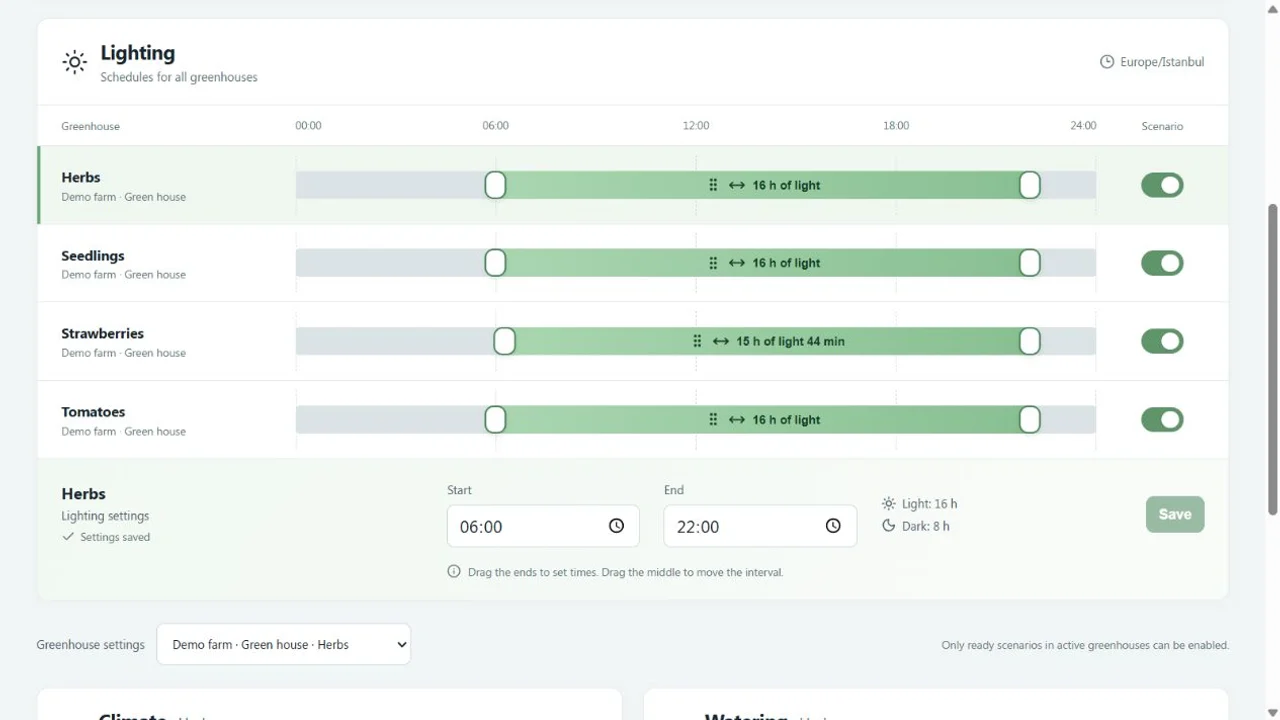
Open the demo light schedules. Select Strawberries, change Start or End and press Save. On a phone, tap that greenhouse's light interval to open the editor with exact time fields.
Return to the shared timeline and check that the selected zone's interval changed. Saving a schedule and enabling a scenario are separate actions; check the switch next to the greenhouse. The overview shows the lamp's current state. Having a schedule does not necessarily mean the light should be on now.
The shared light timeline. Each greenhouse has its own interval. On a phone, tap an interval to open its detailed controls.
3. Run a virtual pump and check the result
Open manual watering in the demo. Find a pump by its assigned greenhouse, select Start watering, leave the mode set to By time, and enter 1 minute. Press Start. The page shows the pump running and the remaining time.
The pump log opens automatically when the run starts. Once watering finishes, compare the result with moisture history and the plants' journals. The virtual pump changes simulated moisture, helping you understand the controls and sequence of events. Real water flow and the response of your growing medium need measurements on your own installation.
Other experiments
Open Devices and growing conditions from the demo menu. On a phone, tap the Demo banner to reveal that menu. You can add a virtual device, then assign it in Farm Builder.
To explore climate control, select a greenhouse's sensor and set a higher temperature. Check the thresholds in Scenarios and make sure the scenario is enabled. Then inspect the fan state and the request for cooling. Change one condition at a time so you can tell what caused the response.
Virtual smart plugs also provide simulated power and energy usage. These values demonstrate the reports; they do not replace a meter or predict your farm's electricity bill.
Keep your changes
A guest demo is kept for 24 hours. To continue later, choose Save demo farm and sign in. A saved demo remains separate from your real devices. To start a fresh experiment, use Reset demo and confirm the reset.
The demo shares the application's plant pages, scenarios, builder and statistics. Device commands run through a simulator. The demo cannot claim a physical Grovika device, issue MQTT access or start firmware updates. Trying the interface also does not establish compatibility with a particular sensor, relay or third-party controller.
Move on to your own farm
Choose Connect my devices in the demo menu or follow the getting started guide. Start with sensors in one zone and check data freshness and history, then add a light. Before automating water, test the pump, measure its flow, configure limits and verify stopping behavior.
The greenhouse Zigbee equipment guide helps with planning. Before the first automatic watering run, work through the limits and emergency stop guide. The hosted dashboard requires internet access; equipment behavior during an outage must be checked separately.
If you already have an installation, message us on Telegram with the number of zones, sensor and controller models, and the task you want to automate. If you are still exploring, start with one change: open the demo and adjust one greenhouse's light schedule.