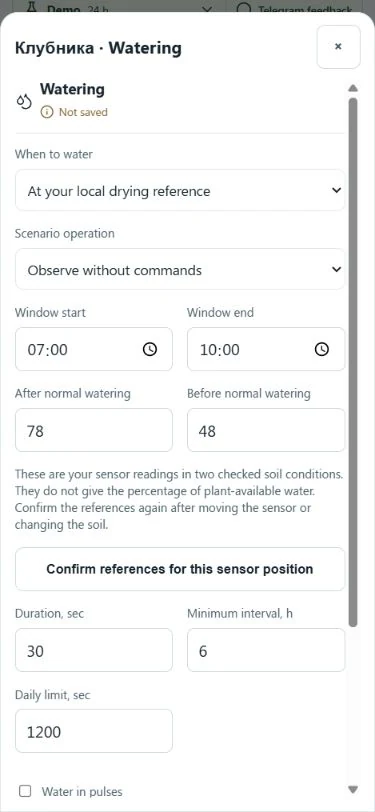
“Water at 40%” sounds clear, but a consumer sensor's number depends on soil, probe position and the device. GrowerHub now uses two checked states of your own soil instead of a percentage copied from someone else's setup.
Record your anchors
Assign a soil sensor to the greenhouse. During normal care, record a stable reading after your usual watering once water has distributed. Record the other anchor before the next normal watering, checking the soil yourself.
In Automations → Watering, choose By local drying anchor. Enter After normal watering and Before normal watering, confirm for the current probe position and save. Set the permitted window, checked duration, minimum interval and daily limit.
Screenshot values are demo training examples. Do not copy them to another bed. Progress between anchors is not a percentage of plant-available water.
Why history matters
One value is insufficient. The app checks fresh readings, a consistent history without large gaps or jumps, and response to completed normal watering.
Missing response confirmation, stale readings or an unreliable series cause waiting with an explanation. A flat line does not prove more water is needed.
A new mode starts in observation without commands. Compare its decisions with usual care. Control is a separate choice, requiring an admitted executor, sufficient data and a checked dose.
After moving the probe
Changed soil or probe position gives old numbers a different meaning. Record and confirm new anchors. Another assigned device or channel does not inherit the previous confirmation.
The app does not keep topping up without a response. For provisional timing, see the drying forecast.